Maintain full visibility of your grain; from harvest to storage to sale
Cart adds full grain management to your Agworld workflow, so you can track grain storage, quality, contracts and deliveries alongside your cropping records. With Cart + Agworld, you’ll always know how much grain you have, where it is stored, what quality it is, and how much you still need to deliver.
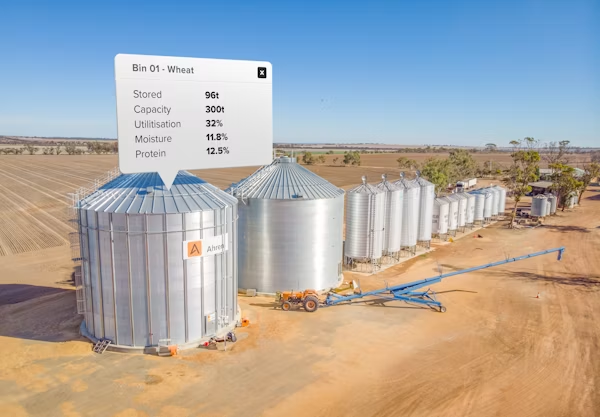
Grain management, contract tracking and storage visibility in one place
Cart synchronises with your Agworld field and crop data, so when you record the planting of a crop in Agworld, Cart automatically imports field production information, crop variety, and season data.
Once grain is harvested and delivered into storage, Cart lets you record where it’s stored, how much you stored, and the quality, including commodity, grade, moisture or protein where relevant.
You can also manage contracts and delivery commitments: Cart tracks how much grain you’ve contracted, delivered and what’s still outstanding, giving you clarity over obligations and helping you avoid over- or under-contracting.
All storage and contract information displays on your Agworld map as a Frame, letting you view grain status right alongside your crop and field data.
-
How do I set up my Agworld – Cart integration?
-
Set up the integration by following these steps:
- Sign up or log in to Cart by FarmReady.
- In Cart, navigate to Settings → Integrations → Agworld and connect using your Agworld credentials. Once connected, Cart will automatically import your Agworld farms, fields, crop seasons and varieties.
- Then set up your storage locations, on-farm bins/silos and any off-farm storage or delivery destinations.
- Once setup is complete, any grain production from your Agworld crop data becomes visible in Cart: ready for storage assignment, quality tracking, contract management or delivery scheduling.
-
What data flows from Agworld into Cart?
-
The following data flows into Cart:
- Farms, fields and crop seasons, so Cart has the correct production context.
- Crop varieties: variety data from Agworld is imported so stored grain can be correctly labelled.
- Production data: when crops are harvested, Cart lets you record grain stored against the correct field/season.
-
What features does Cart provide for grain management?
-
Cart provides the following features:
- Manage on- and off-farm grain storage (quantities, location, capacity, utilisation)
- Track grain quality and grade (where applicable) for stored commodities
- Monitor contract positions: keep track of how much grain is contracted, delivered and what remains to be fulfilled
- Record grain movements (field → storage → delivery) across the business for full traceability
- View all storage and contract info directly on your Agworld map as a Frame, filtered by location, commodity, or storage status, giving you spatial visibility of grain assets.
-
Are there any limitations to the integration?
-
Harvest loads from Agworld cannot automatically be converted into Cart deliveries. To record stored or delivered grain, users must manually create deliveries in Cart after harvest.
Your benefits
Full grain-management clarity, from harvest to silo to sale.
Cart records every load, every bin, every contract; no more guessing or relying on memory.
Keep delivery commitments, storage allocations and contract fulfilments organised and in one place, avoid mis-shipments and under-delivery.
Cart + Agworld puts everything inside one digital workflow; your grain inventory moves from harvest logs to contracts to sales with minimal manual handling.
Cart storage locations and grain statuses appear inside Agworld maps as frames, giving you spatial awareness of where your grain is stored or pending delivery.
