Crop colors are one of the quickest ways to read a map. At a glance, you can see where each crop is planted and how the season’s plan is coming together. Until now, crop color has been a personal setting in Agworld. If your business wanted a consistent color scheme, each user had to set their own colors.
That’s why we’ve introduced Company and Organizations Crop Colors. From a new Crop Color Management page, company admins can now set crop colors once and make them the default for everyone in their company or organization. The result is one consistent color scheme across Maps, Planning, Reports and the Agworld mobile app.
Set your crop color once
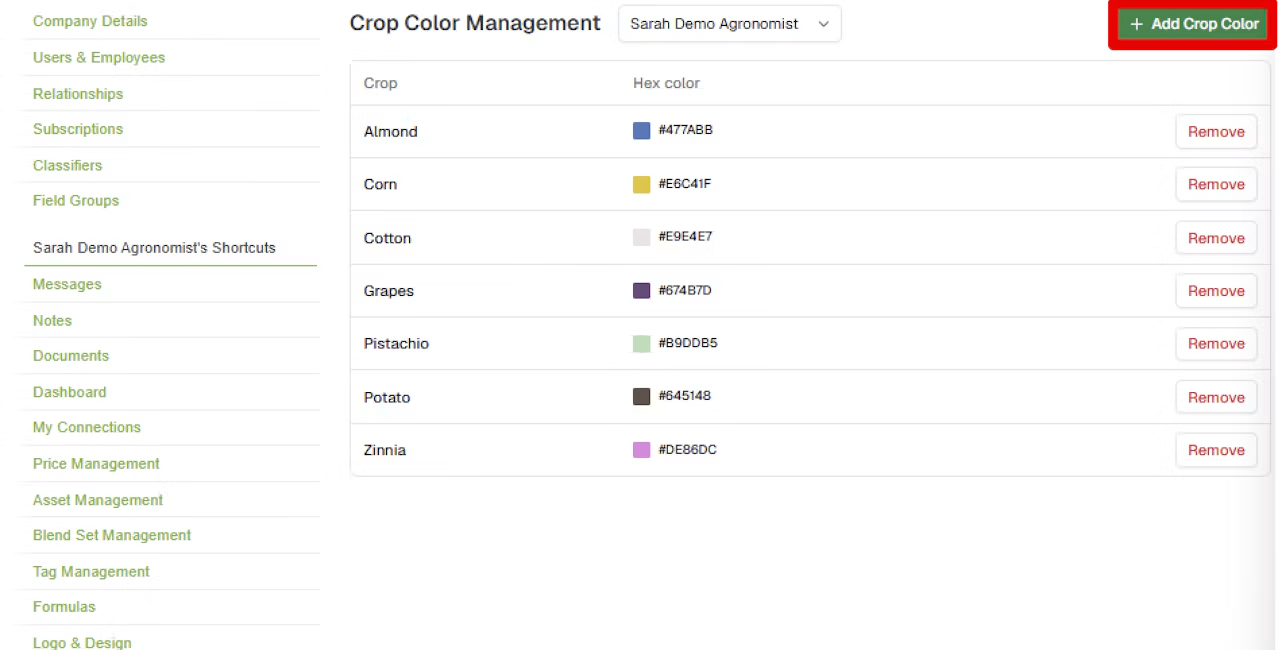
The Crop Color Management page lists each crop alongside its assigned color. Select ‘Add Crop Color’ to assign a color to a crop, or remove colors you no longer need. Before anything is saved, Agworld shows your unsaved changes and reminds you that they will update crop colors for all users in your company, so there are no surprises. Once you save, the new colors are applied to all current users in scope. Instead of updating dozens of accounts individually, a single admin action keeps the whole team up to date.

Organization defaults with company-level flexibility
Crop colors can be set at two levels. Admins that sit at the head office can define colors for the entire organization (this means all companies that sit under the organization will take on the set color), while company admins can set colors for their own company (this color change will just impact their company, not others within the organization). When both are set, company colors take precedence. If you have questions on how your Enterprise or Ag retailer account is structured, please reach out to a customer success representative to assist you.
This gives multi-company organizations, such as Agworld enterprise clients and ag retailers, the option to choose a single visual standard, while still allowing an individual farm unit to use its own color scheme where this is preferable.
One visual language on every map and report
Saved colors appear everywhere crop color is used in Agworld, including:
- Maps
- Planning
- Reports that include a field map
- The Agworld mobile app
When everyone sees the same colors, maps are quicker to read, plans are easier to discuss and reports look consistent, whether they’re being reviewed by a colleague, an agronomist or a client.
A consistent view across your operation
Company and Organization Crop Colors override account-by-account setup with one simple admin workflow. Whether you’re managing a large growing operation, a team of agronomists or several companies within one organization, everyone can now work from the same map. Company and Organization Crop Colors are available now on the Agworld web platform for organization and company admins. You can learn more in the Agworld help center to learn more.