Streamlined farm inventory management, fully integrated into Agworld
Connect Agworld with Shed to manage chemicals, fertiliser, seed, fuel and other on-farm inventory across storage locations, and keep stock levels automatically updated based on your ‘actuals’ in Agworld.
With real-time stock insights and integrated usage tracking, Shed helps you avoid shortages, reduce excess stock, and make smarter purchasing decisions for every season.

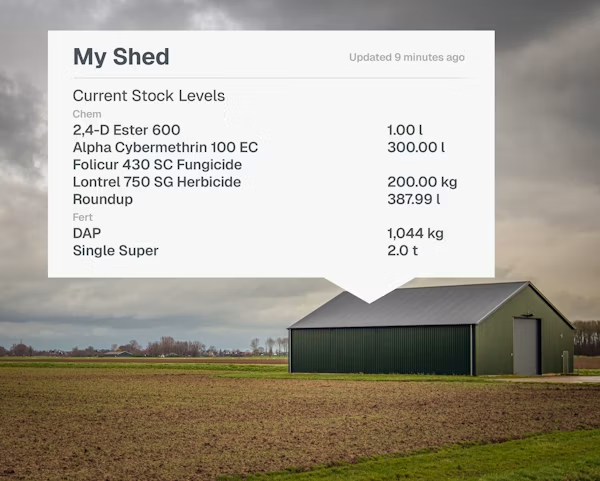
Real inventory control, integrated into your agronomy workflow
When you link Agworld with Shed, every time you record chemical, seed, fertiliser, or fuel usage as an ‘Actual’ in Agworld, Shed automatically deducts the used quantity from your on-farm inventory.
Shed tracks all inventory movements, including receipts, returns, transfers, stocktakes, and adjustments, so you always know what’s in storage, where it’s stored, and what’s been used.
It also forecasts future stock needs based on outstanding work orders, helping you anticipate shortages before they affect your operations, defer purchases where possible, and optimally time purchases throughout seasonal pricing changes.
-
How do I set up my Agworld – Shed integration?
-
Follow the following steps:
- Sign up or log in to Shed by FarmReady.
- In Shed, navigate to Settings → Integrations → Agworld and follow the prompts to connect your Agworld account.
- Once connected, define your storage locations and — optionally — set default storage rules for chemical, fertiliser, seed and fuel per farm (or per storage) to simplify future entries.
-
What inventory data flows between Agworld and Shed?
-
Here’s what flows between the two systems:
- Shelf-on-farm inventory (chemical, fertiliser, seed, fuel and other stock), stored in Shed across defined storage locations.
- Usage data from Agworld actuals / work orders; when an operation is recorded, Shed automatically deducts quantities used from your stock on hand.
- Forecasted usage/shortfalls; based on outstanding work orders, Shed projects required stock levels to help with procurement planning.
-
What functionality does Shed provide beyond stock-on-hand tracking?
-
Other functionality Shed provides includes:
- Receipts & returns: Record new deliveries or returned goods.
- Transfers and storage location management: Move stock between different storage sites on farm.
- Stocktakes & adjustments: Conduct physical counts and reconcile discrepancies (expired, damaged, or missing stock).
- Product valuation & cost tracking: Shed keeps a moving average unit cost for all inventory, enabling accurate cost tracking over time.
- Collaboration: Invite team members to view or manage inventory; works across farms and storage locations.
-
What happens if I don’t complete the integration setup (storage rules)?
-
If you don’t define default storage rules, you’ll need to manually tag storage locations for each usage or actual in Agworld, which may increase admin burden. The recommended approach is to set “Farm Defaults” so that standard chemical, seed, fertiliser and fuel use automatically map to the correct storage.
Your benefits
Accurate inventory, better planning; chemical, fertiliser, seed and fuel under control.
Shed automatically deducts used inputs when you log operations in Agworld; no manual stock-count after spraying or seeding.
See what’s in each storage shed or silo and track stock across your entire enterprise, not just the fields.
Shed predicts future stock requirements based on planned or scheduled operations, helping you pre-order and avoid running out mid-season.
With moving average unit cost tracking and accurate usage logs, you get clear insight into your input costs per field, season, or enterprise, supporting better budgeting and profitability analysis.
